

Find matching jobs is available to everyone who uses JobFit.
Search for matching jobs
1
Open the application
In Applications, open the person’s application.
2
Start the search
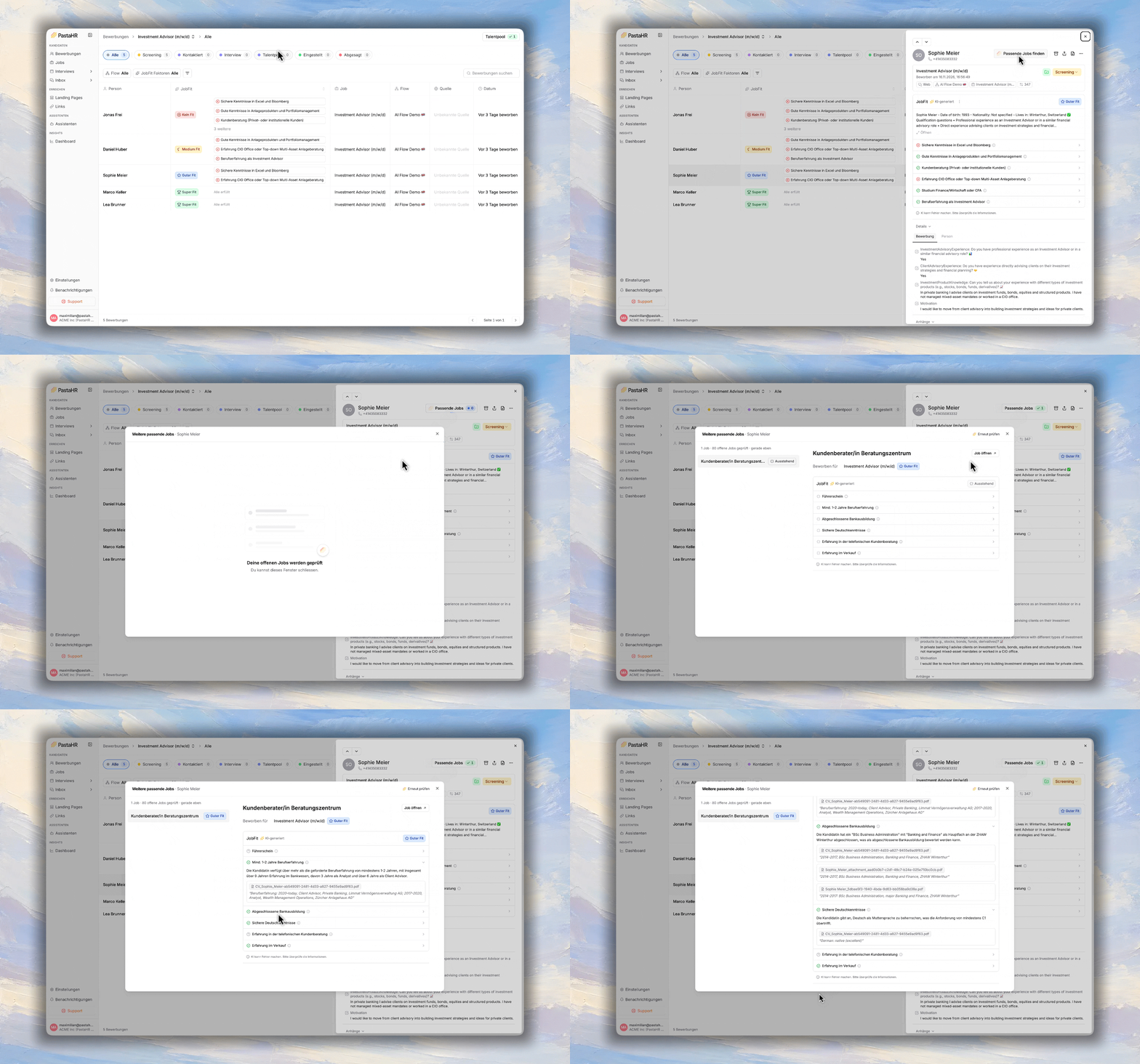
Click Find matching jobs at the top, next to the name. The check takes a moment. You can close the window and keep working, the search continues in the background.
3
Review the results
The button then shows how many matching jobs PastaHR found. Click it to open them. At the top, you see how many jobs fit and how many open jobs were checked. The jobs are sorted by JobFit, best first.
What you see for each job
- Applied for: the job the person applied for, with their JobFit result. This lets you compare directly where they fit better.
- JobFit: the person’s evaluation for this job, with all factors. Click a factor to see the reasoning and the relevant passages from the documents.
- Open job: opens the job in a new tab.
AI can make mistakes. Review the suggested jobs before you approach the person about them. The decision is always yours. Learn more in AI can make mistakes.
Related pages
AI Talent Pool Search
The other way round: find people who fit a job.
JobFit
How PastaHR evaluates applications and which profile applies to a job.